
Does your Sega Dreamcast sound like it’s about to tear itself to pieces every time it loads a game? The GD-ROM drive’s factory grease dries out over the years, and the seek noise from the laser assembly gets louder and louder. The easy fix is to lift out the laser assembly and re-grease the gears, worm drive and guide rail. This step-by-step guide covers the full disassembly, the greasing and, just as importantly, how to put the shell back on without breaking the fragile lid switch.
What you need
- A Phillips No.1 screwdriver (a No.2 will do at a push; a magnetised one makes life easier)
- Medium consistency lithium grease
- Toothpicks for applying it
- Cotton buds and 99% isopropyl alcohol
- A couple of sheets of kitchen roll so the top of the console doesn’t get scratched when it’s upside down
These days the grease I use is SGPGT90, which is plastic and rubber safe.
Opening the Dreamcast
First check there’s no disc inside (mine had Soulcalibur in it) and pull the power lead. Even unplugged, there can still be nasty voltages hanging around in the internal power supply, so bear that in mind for later.
Put the kitchen roll on top and turn the console over. There are four black outer screws: three are easy to find, and the fourth is hidden under the modem. Press down on the modem’s tab and pull it outwards (it can be stiff after years in a loft or garage), then remove the screw underneath. Black screws are outer screws, which makes them easy to keep track of.
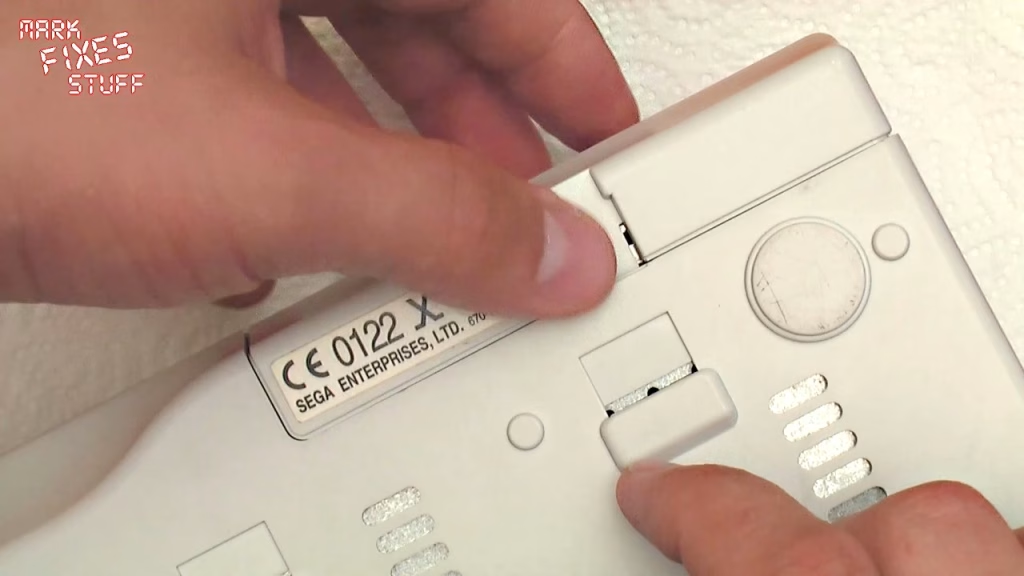
Always open the lid before lifting the top shell
Turn it the right way up and, before you lift anything, open the disc lid. The lid detection switch is buried in the mechanism, and if you lift the top half off with the lid shut you can jar or break it. Putting the top back on with the lid shut is even worse, as you’ll knock straight into that switch. With the lid open, the top half lifts off easily: there are no wires in the way.
Removing the power supply board
The laser assembly is the part we’re after, but for safety I take the power supply board out first. Unplug the white two-wire power plug at the back by pressing the top to lever it and wiggling it free. I leave the power switch where it is (it’s two screws if you do want it out). Then remove the two gold-coloured screws holding the board (gold means internal), pull back the small plastic clip, and the board lifts up towards the front.
The board connects to the motherboard through pins coming up into a socket, and that connection can be a cause of random reboots and resets. Grip it firmly by the edges, wiggle it out, and keep your fingers well away from the components, as the capacitors can hold a charge. Fit the shielding back underneath before you put it down, somewhere no children, dogs or goldfish can reach it.
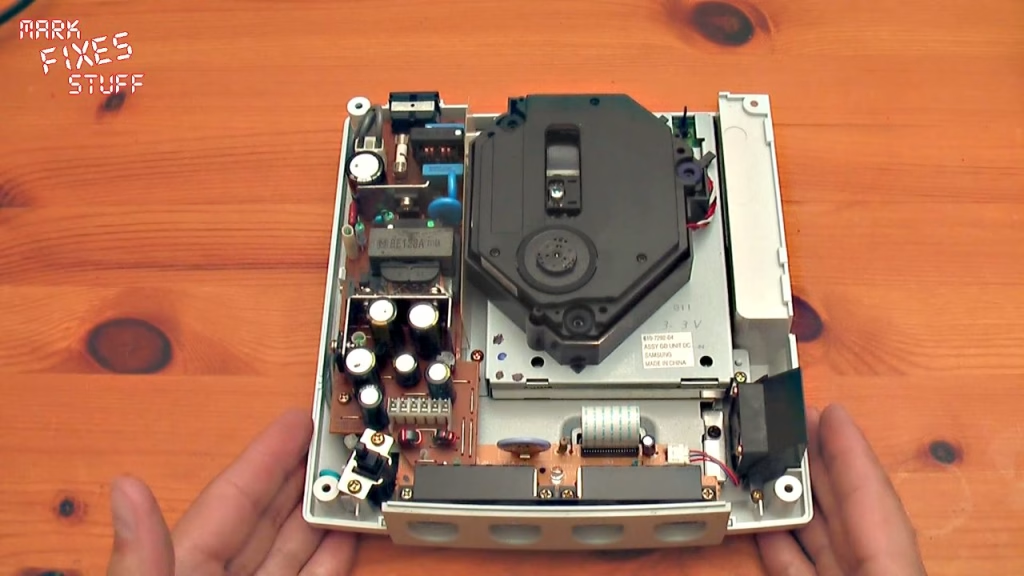
Lifting out the laser assembly
I don’t do a full strip-down of the drive: the aim is to get in, grease it and get out. I may draw fire for this, but I’ve done it many times on CD-ROM, GD-ROM and DVD-ROM mechanisms without problems. Without touching the lens, push the head down slightly and slide it as far from the spindle as it will go. That gives you the most slack in the ribbon when you flip the assembly over.
On the other side, the laser’s cable is held by two black retaining clips. Lift it out from under them with the tip of a screwdriver. Then grasp the assembly gently, wiggle it, and lift it off. There’s some resistance from the three rubber grommets that act as shock absorbers.
How to grease a Dreamcast GD-ROM drive
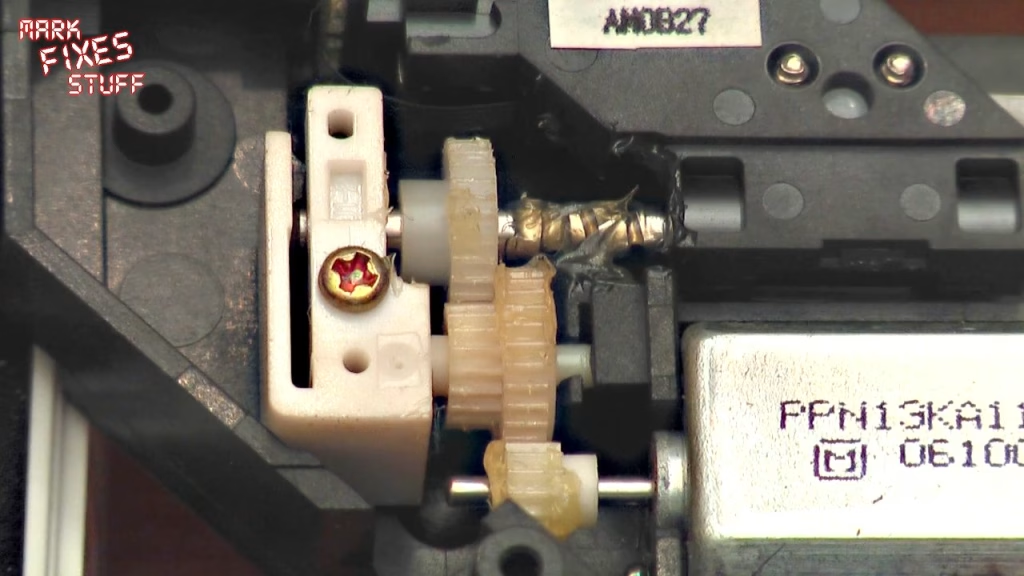
Flip the assembly over and there are three places to grease: the gears, the worm drive screw and the guide rail. I apply it with a toothpick, partly because it’s a nice fine tool and partly because it isn’t magnetic: the motor is, and a metal tool can drag the mechanism around.
- Gears: you can be fairly liberal here, as they’re nowhere near the reading mechanism. Apply a glob, smear it with the dry end of the toothpick, and turn the gears. You only need to do one side; it propagates around.
- Worm gear: add grease inside the rail and plenty along the screw. You can’t reach every part of it, but the drive spreads it along and it also lubricates the inside of the shaft. It’s very hard to do any harm with lithium grease here.
- Guide rail: the least of the noise problems, but wherever moving plastic meets metal it’s worth lubricating.
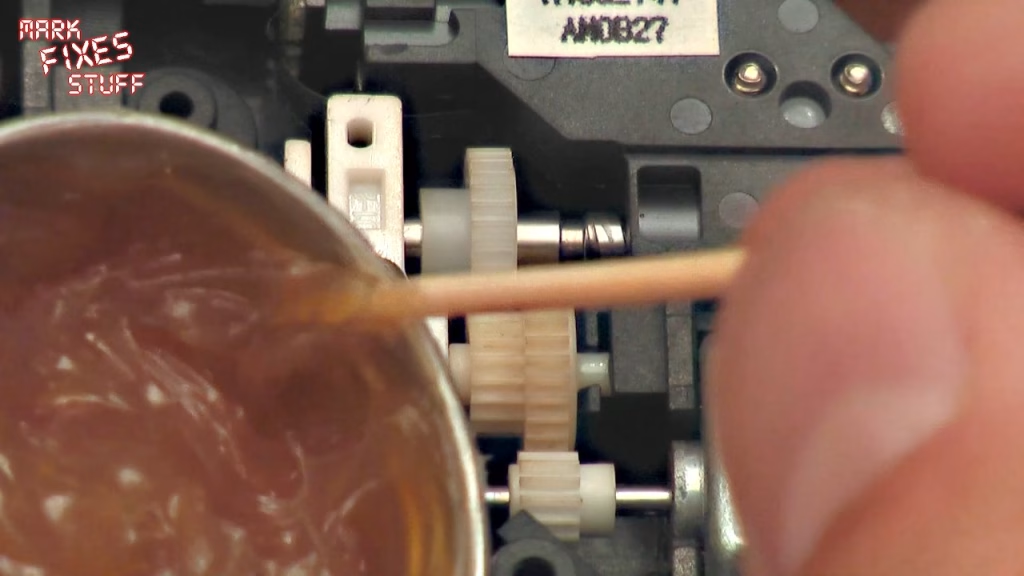
Why so little grease from the factory? Grease costs money, so they used the bare minimum, and after this many years it dries out.
Putting it back together
Feed the assembly back in without touching the lens, seat the three rubber grommets (they go back fairly naturally) and tuck the cable back under both retaining clips. There’s no need to move the laser head back: it seeks to its home position at power on.
Before refitting the power supply it’s worth cleaning its pins if you’ve had random reboots. Make sure the insulation sheet sits correctly over its pin and around the moulded post, with the power cable running underneath. Line up the connector at the back with its slots, line up the pins and the clip, then press down gently with a wiggle; you’ll know it’s right when it sits perfectly and you can see the pins through. Refit the power plug and the two gold screws, finger tight only, as it’s metal into old plastic.
While the grease is out, I put a little dab on the plastic-on-plastic part of the lid mechanism under the top shell. It isn’t a big source of noise, but two different plastics rubbing together will wear eventually. Then, with the lid open, place the top shell squarely down and let it find its own level until it drops into place. Check the mouldings meet all round, close the lid, and refit the four black screws.
Did it work?
With Soulcalibur back in and the power on, the difference was clear. A Dreamcast is never going to be quiet, but with fresh lithium grease on the gears it’s significantly quieter, without the grinding that had built up over the years.
Related
More Dreamcast on the site: fixing a Dreamcast controller port fuse, installing a custom Dreamcast BIOS and the Dreamcast VMU rescue.
Leave a Reply