It’s VERY easy to remove the “Sell Something” option from Facebook Groups. Here’s how…


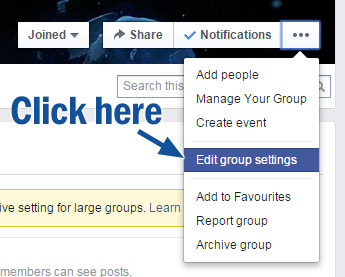
Step one: Click the ellipses […] on the right of the Group Banner Toolbar.

remove-selling-option-from-facebook-groups-02


Step two: Click on Edit group settings.
remove-facebook-sell-feature-03


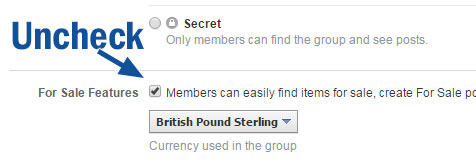
Step three: Scroll down and uncheck the box that says “For Sale Features”.
undo-facebook-selling-facbook-groups


Step four:
Don’t forget to scroll down and save your changes.

undo-remove-facebook-group-sell-something-feature


Selling features will be removed from your Facebook group. You can turn on selling features again if you wish by reversing the process.


Support The Channel!

Support Mark Fixes Stuff on Patreon

Become a Patron on Patreon for Behind-the-Scenes videos, exclusive posts, Patron chat and Ad-Free content.

Support Mark Fixes Stuff on Ko-fi

Use Ko-Fi to either send a one-off donation or to set up a regular support contribution.

Recent Posts

Categories

Tags